

The problem
One meeting room, several teams, and no real system. Bookings lived in a group chat and in people's heads. You'd scroll up to find who said "I'll take it Thursday afternoon", someone would miss the message, and two meetings would end up standing at the same door.
The question people asked most wasn't even "can I book it?". It was "is the room free right now?", and nobody could answer it without walking over.
What mattered
Before drawing anything, I wrote down three rules:
- No login. An internal tool that asks for an account gets ignored, and everyone goes back to the chat. Booking had to be as quick as sending a message.
- Answer "is it free now?" in one glance, before anything else.
- Make clashes impossible, not just unlikely.
What I built
"Free now" comes first
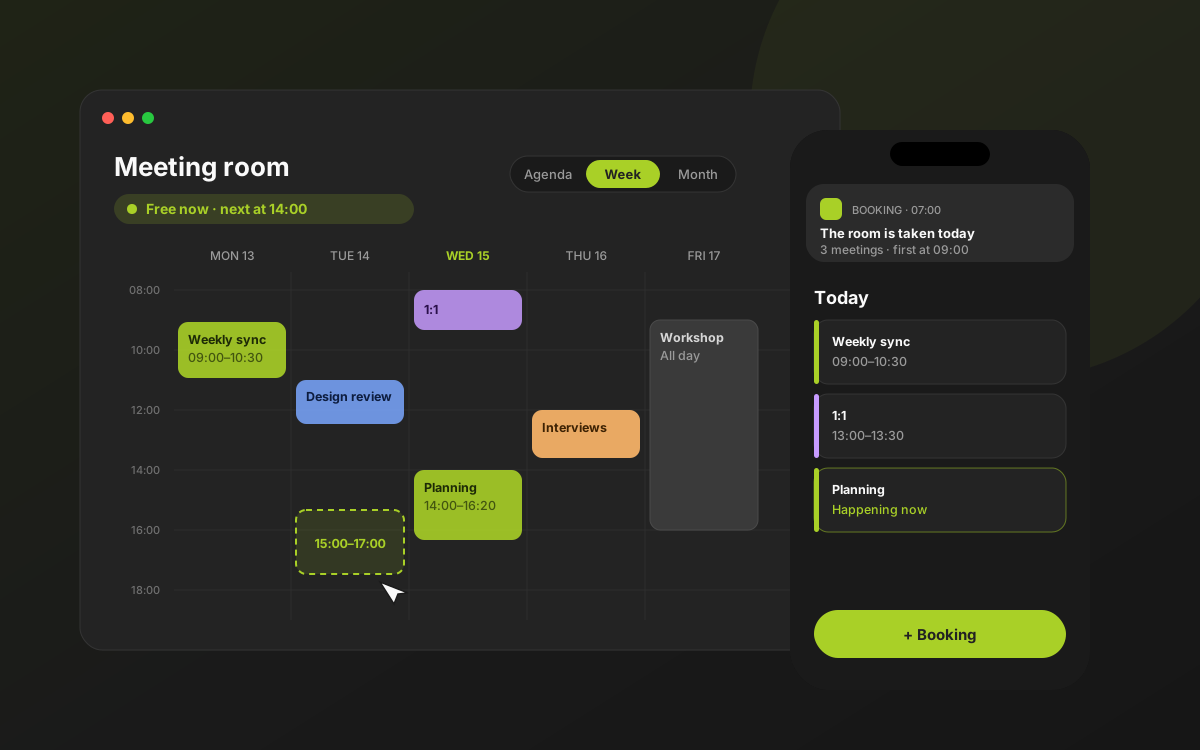
The top of the app is one line: Free now · next at 14:00, or Taken now · until 15:30. It answers the most common question before you've even scrolled.
Book by dragging, like a calendar you already know
In the week view you drag across the grid to pick a time, the way Google Calendar works, so there's nothing to learn. On a phone it's tap an empty slot, then pull the handle to set the end. Moving a meeting is just dragging its block somewhere else; stretching it changes the length.
Agenda (today and what's next), Week and Month cover the three ways people think about the room: now, this week, and is the end of the month free for the workshop?
No accounts, still no chaos
Without logins, who's allowed to move or delete a booking? The person who made it, on the same device, recognised by a private token stored there, plus an admin who can fix anything. Everyone else can see everything but can't break someone else's plan.
The server checks every new booking and every move against the others. If it would clash, it's refused and you're told exactly which meeting is in the way, so you can pick another slot right away instead of guessing.
It tells you, so you don't have to check
- At 07:00 a push notification says if the room is taken that day and when the first meeting starts.
- When someone books for today, everyone who turned on notifications hears about it right away.
- While the app is open, a new booking from someone else shows a small toast with a soft chime (you can turn the sound off).
It's a PWA, so it installs to the home screen on iPhone and Android and opens like an app, no store needed.
Sharing still happens in chat, just tidier
Teams still coordinate in chat, so I leaned into it instead of fighting it. Any booking, or a whole day's schedule, can be shared as a neat message with a link back to it, in Indonesian or English.
Small things that make it feel finished
Indonesian and English, light, dark or automatic, your own theme colour, opening hours enforced (no 3 a.m. bookings by accident), and all-day bookings for workshops.
How it's built
A Next.js web app installed as a PWA, with bookings in a Redis database, Web Push for notifications and a daily scheduled job for the morning heads-up, all on Vercel. Small, cheap to run, and nothing for the office to maintain.
What I'd do next
- Recurring meetings for the weekly ones.
- More rooms, with a "find me any free room at 2" search.
- Two-way sync with Google and Outlook calendars.