

FlickFlick 1.15 is out. If you already have it, it updates itself; if you don't, it's free for Mac and Windows. This one is mostly about a new place for FlickFlick to live: the top of your screen.
The Island
The media ring is great when you reach for it. But sometimes you just want to glance at what's playing, or skip a track, without opening anything. So FlickFlick now has an Island: a small black pill at the top of your screen that wraps around the notch on a MacBook (or sits in the middle of the menu bar on a screen without one).
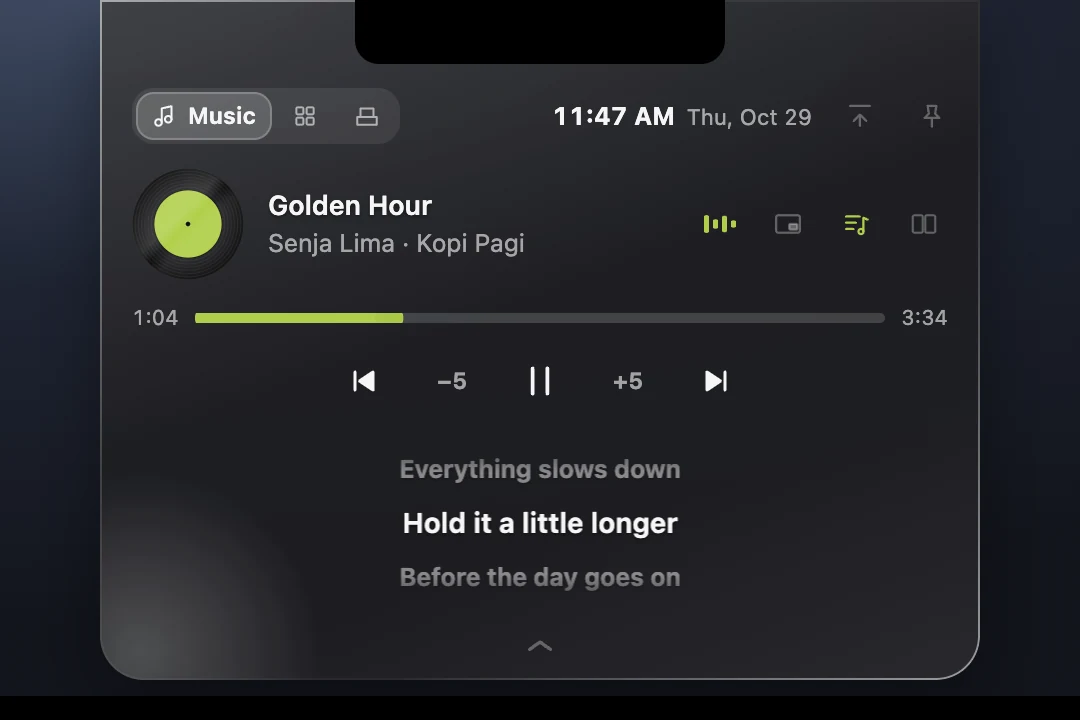
When it's small it shows the song and a thin progress line. Open it and you get the record (spinning, like on the media ring), a seek bar you can drag, − / + to jump, the controls, and the lyrics as they're sung: the line before, the line now, the line after, gliding up as the song goes. Lyrics can sit under the controls or beside them, and a button on the island switches them off when you don't want them.
It follows your style. Flat, Skeuomorphic with its LED panels, or Liquid Glass with all its light. In Settings → Preferences → Island you pick how it behaves (Off, Auto-hide, Always), its shape (hanging from the top, flaring into the screen's edge, or floating just below it) and how see-through it is.
It opens when you mean it
The menu bar is right there, and the first version of the island opened every time the pointer brushed past on its way to a menu. That's annoying. Now it waits. Push the pointer to the very top of the screen and hold it there: a small ring fills up under the notch. When it's full, the island opens.

The moment it's full you feel it: the ring floods with your accent colour, bounces once, your trackpad taps, and as the island grows the colour washes softly across it and fades. Move away before the ring fills and nothing opens.
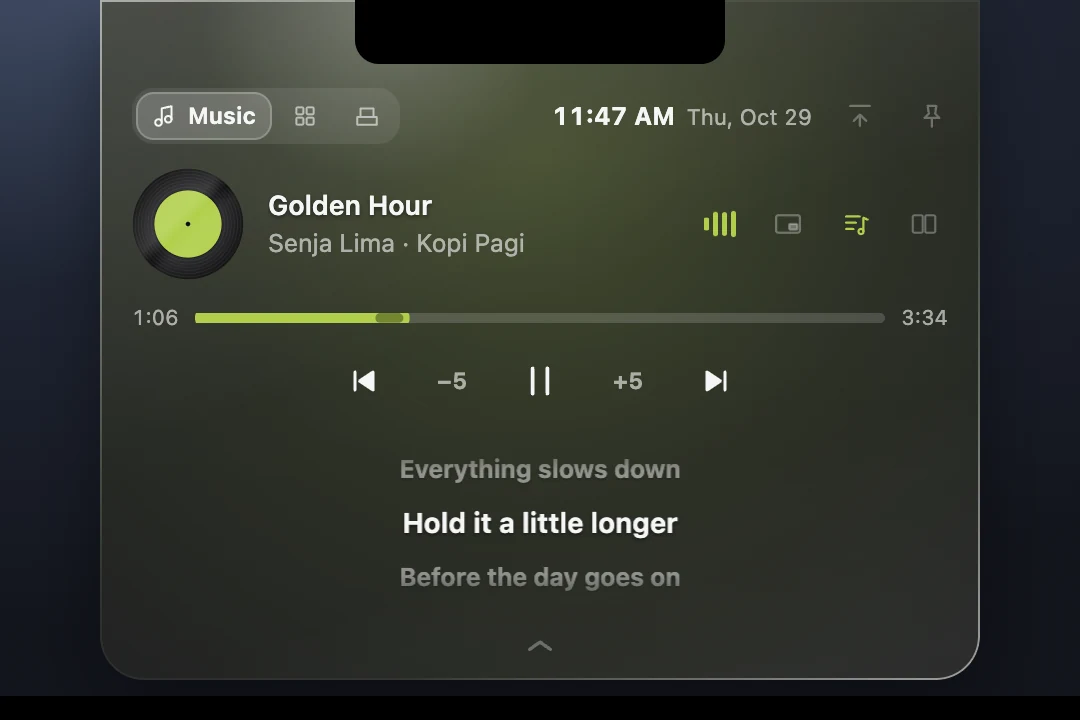
Shortcuts and a shelf
The open island has three tabs. Music is what's playing. Shortcuts holds the apps, files, folders, links and actions you pick in Settings, one click away from wherever you are. Shelf is a place for files: drag files onto the island and it offers to share them (AirDrop, Mail, Messages on a Mac), convert them, or keep them on the shelf so you can drag them out later into an email or a chat.
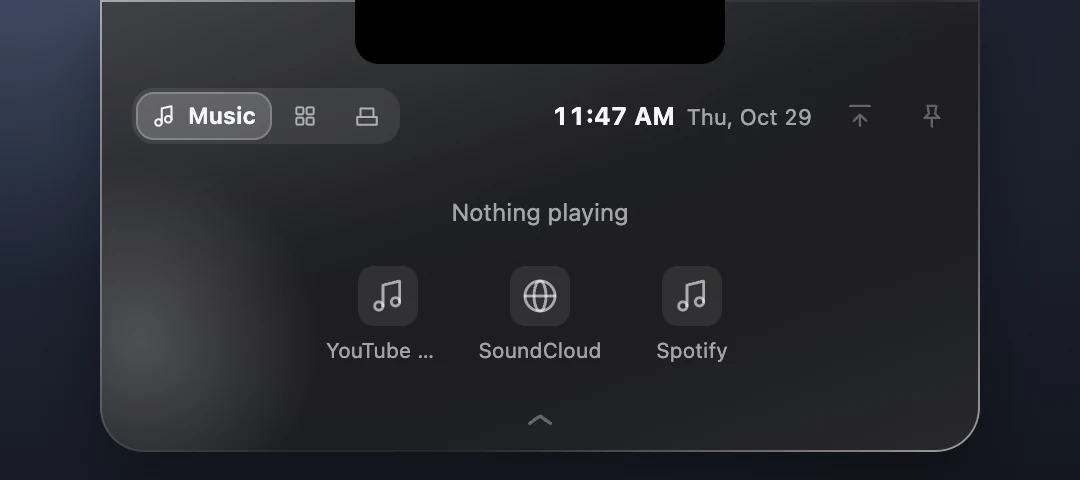
And when nothing is playing, the Music tab doesn't just say so. It offers the places you listen, the same ones as the media ring's Play button, so starting music is one click.
It gets out of the way
Watching a video full screen? The island steps aside on its own and comes back when you leave full screen. Want it gone for a while? There's a Hide button on the island. It tucks away into the top edge, and a little hint drops down to show you how to bring it back: hold the top edge, the same way you open it.

Picture in Picture, for any video
Not every video player has Picture in Picture, and the ones that do often lose it when you switch tabs. FlickFlick now has its own. Start it from the island, or put the Picture in Picture action on a ring. It shows the window the video is in, you draw a box around the video (with a magnifier, so the edges are exact), and the video moves into a small window that stays on top of everything. It snaps to the edges of the screen, tucks away at the side with a handle to pull it back, and has play, pause and skip on it.
Games in search
Sometimes you need a random answer. Type roll (or roll 1 100), dice (or dice 20 for a d20) or flip coin in search and press Enter: the number counts up, the die tumbles and lands showing its pips, the coin spins in the air. Enter again rolls again.
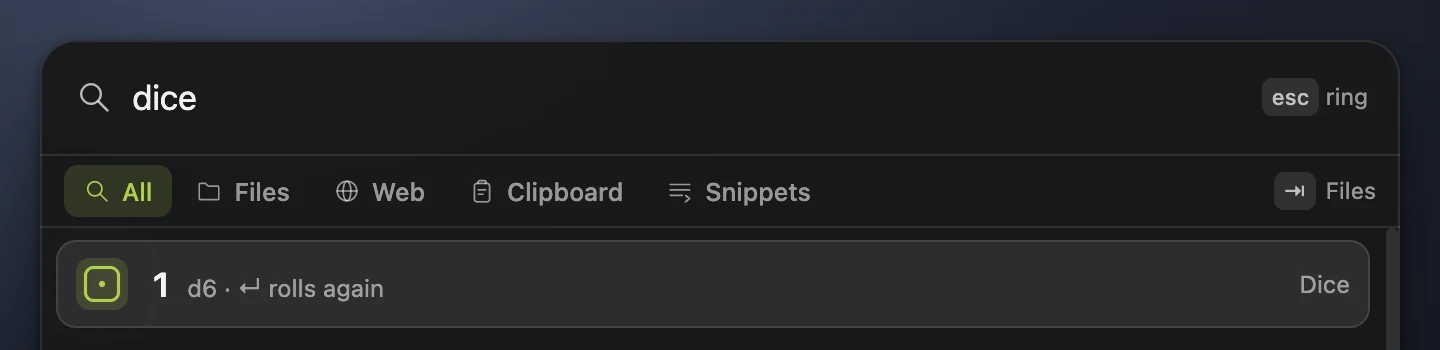
Search also got smaller things: the empty search shows what you used recently (apps, files, web searches, snippets), each scope has its own recents, clipboard items and snippets have a Copy button under their preview, and ⌘K's menu filters as you type.
A steadier media ring
- SYNC. When the ring and your player disagree about where the song is, a SYNC button on the record starts over with the player.
- Firefox. A YouTube video in a playlist used to show up as LIVE, because Firefox doesn't tell macOS how long it is. FlickFlick now asks YouTube. And the 0:00 Firefox reports after you seek, or a closed tab that kept showing, no longer stick.
And
- On a Mac you can open a ring or a command by double-tapping ⌘, ⌥, ⌃, ⇧ or fn.
- Eject checks the disks are really gone before saying so, and ⌘ picks one disk when there are several.
- Every icon-only button has a tooltip.
Every version, in one place
FlickFlick's site now has patch notes: every release from the first one to this one, with what changed in each, grouped by area.
Comments
No comments yet. Be the first.