

Every day I make the same small trips: up to the menu bar to toggle something, down to the Dock to open an app, over to a browser tab to pause the music. Each trip is only a second or two. Hundreds of them a day add up to a lot of cursor travel for very little work.
So I built FlickFlick: press a shortcut and a ring of your apps and actions opens right under your cursor. Move toward one, click, done. It's free for macOS and Windows, and it stays free.
The idea: Fitts's Law, taken literally
In my 8 UX laws post the first law is Fitts's Law: the time to reach a target depends on how far away it is and how big it is. Menu bars and Docks break both halves. The targets are small, and they sit at the edges of the screen, as far from your cursor as they can be.
A ring flips that. It opens where your cursor already is, so the distance to every action is the same and very short. Each slice is a big wedge, so you can't really miss it. You don't even have to aim at the slice itself: you just move in its direction.
What it does
The ring is the heart of it, but once it was there I kept putting the things I reach for most into it:
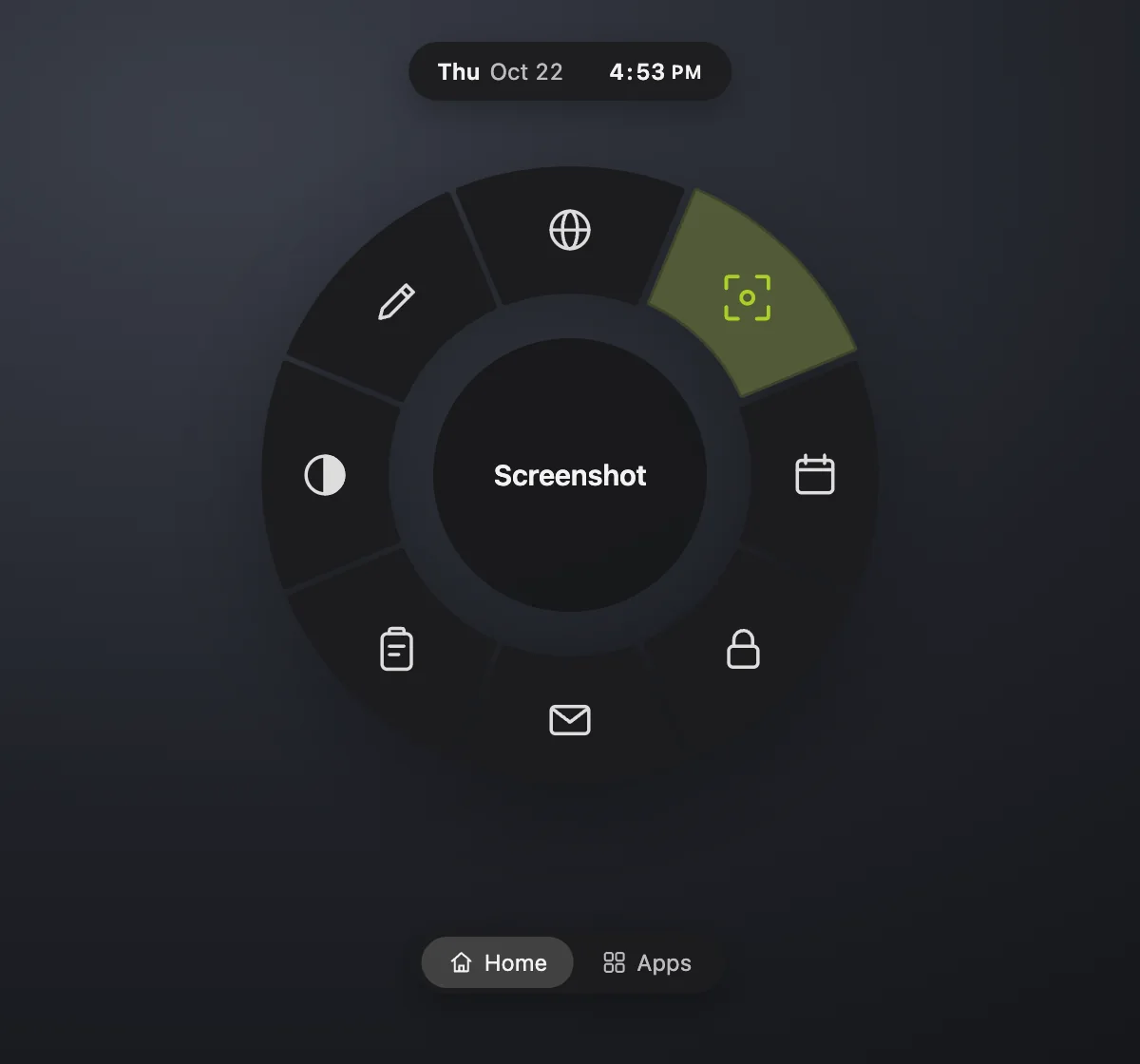
- Rings for different jobs. A Home ring with screenshot, dark mode, lock and Trash, a Media ring, a Convert ring, an Apps ring. Press the shortcut again to spin to the next one.
- Type to search. Start typing on the ring and it turns into search: apps, actions, snippets and clipboard history. ⌘K on a result lets you pin it, give it an alias like
fffor Figma, or uninstall an app. - Answers in the search bar.
12*(3+4)gives you 84.8.5 usdconverts into your own currency. - Snippets that expand as you type. Type
shruganywhere and it becomes ¯\_(ツ)_/¯. Dates, times and your clipboard can go inside. - Clipboard history, screenshots included, so the thing you copied ten minutes ago is still there.
- A Media ring with the album art on a spinning record. Scroll for volume, swipe to skip, drag the progress arc to seek.
- Convert files selected in Finder to PNG, WEBP, PDF, MP4, GIF or MP3, several formats at once.
- Screenshots you can mark up with arrows, ovals and speech bubbles, and blur or redact anything private before you share it.
The details I cared about
A tool you open a hundred times a day has to feel good the hundredth time, so most of my time went into the small things:
- Feel. The ring springs open from the centre with a soft, damped sound and a light haptic tap. Moving between slices ticks quietly. Every sound can be turned down or off.
- Readable in any colour. Pick any accent colour and FlickFlick adjusts its shade for light and dark mode, so text on it always meets WCAG contrast. Every text and background pair is checked automatically.
- Make it yours. Your own rings, icons, hotkeys and sub-slices. Hold ⌘ on a slice to fan out more options, like where to play music.
- Private by design. Everything stays on your computer. The only thing it ever fetches is today's exchange rates, and only after you type an amount.
- It updates itself, quietly, at a moment you're not using it.
Free, forever
I made FlickFlick for my own work, and I'm giving it away. No trial, no account, no ads, no "pro" version hiding the good parts. Every feature above is yours, and it stays free.
If it ends up saving you time, there's a small Support the project section on the download page. It's completely optional; sharing it with a friend who lives in the Dock helps just as much.
Get FlickFlick for Mac or Windows →
It takes a minute to set up: download, drag it into Applications (or run the installer on Windows), and a short welcome tour sets your shortcut. Then press it anywhere and flick.
Comments
No comments yet. Be the first.